




















Overheated Acer Turns Out That The Fan Was Rusted
Get 1000000 0FP0EXP Token to remove widget entirely!
Get 500000 0FP0EXP Token to remove my NFTS advertisements!

An acquantance of mine have an AMD Quad Core R4 Graphic Acer Laptop which was not used for years because the charger was lost. Instead of leaving it in the dump, why not sell it to me for a cheap price. I bought it and searched for a suitable charger and got it. However, it did not last long where it always suddenly shutdown after a few minutes. Since the laptop was in the dump for a very long time which can be counted in years, I tried cleaning the outside first but still, it did not work. Before I checked the inside, I had to be sure that it was not the operating system (OS) problem. So, I tried booting Ubuntu using bootable USB and the same thing that it did not last. I was convinced that it was hardware problem.
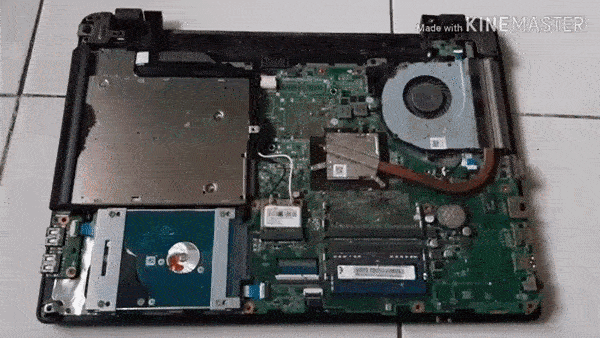
I proceeded with the next safe practice step which is minor disassembly and cleaning the inside. I assembled it again as tidy as possible but still it does not work. Next, I decided to feel the laptop each time it boots and finally found the problem that it was overheated. I disassembled it again, checked the heat sink and cleaned it. I boot it again while still disassembled, it still did not work but I finally found the problem.
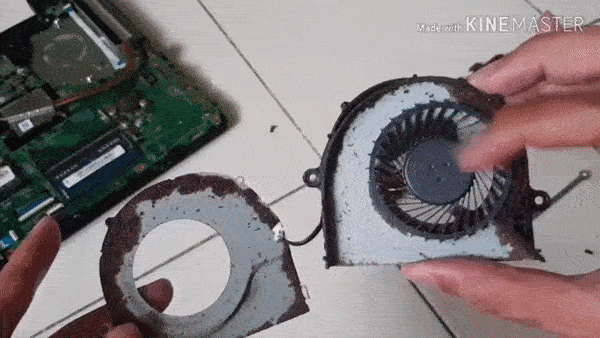
The problem is with the fan that it did not spin fast enough to release the heat. I tried cleaning the fan but still it would not spin well. I finally decided to take off the fan and found the problem that there were some rust on the steel cover which was hindering the movements of the fan. Sandpaper would have been ideal to wipe the rust but I did not have it at the time and decided to scratch them with a screw driver. After I cleaned most of the rust, the fan finally spins well.
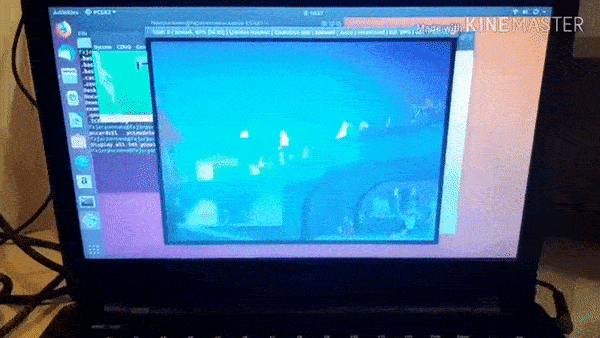
Cleaning the rusts on the fan fixed the problem and now I can use the laptop normally. Curious of what the gif animation is? It is a PS2 emulator playing Suikoden 5.
Mirrors
- https://www.publish0x.com/0fajarpurnama0/overheated-acer-turns-out-that-the-fan-was-rusted-xykkejw?a=4oeEw0Yb0B&tid=github
- https://0darkking0.blogspot.com/2020/12/overheated-acer-turns-out-that-fan-was.html
- https://0fajarpurnama0.medium.com/overheated-acer-turns-out-that-the-fan-was-rusted-13e1d572c835
- https://0fajarpurnama0.github.io/internet/2020/06/16/overheated-acer-turns-out-that-the-fan-was-rusted
- https://blurt.buzz/blurtech/@fajar.purnama/overheated-acer-turns-out-that-the-fan-was-rusted?referral=fajar.purnama
- https://stemgeeks.net/technology/@fajar.purnama/overheated-acer-turns-out-that-the-fan-was-rusted?ref=fajar.purnama
- https://steemit.com/technology/@fajar.purnama/overheated-acer-turns-out-that-the-fan-was-rusted?r=fajar.purnama
- https://hicc.cs.kumamoto-u.ac.jp/~fajar/internet/overheated-acer-turns-out-that-the-fan-was-rusted
- https://0fajarpurnama0.wixsite.com/0fajarpurnama0/post/overheated-acer-turns-out-that-the-fan-was-rusted
- http://0fajarpurnama0.weebly.com/blog/overheated-acer-turns-out-that-the-fan-was-rusted
- https://0fajarpurnama0.cloudaccess.host/index.php/13-computers-and-internet/156-overheated-acer-turns-out-that-the-fan-was-rusted
- https://read.cash/@FajarPurnama/overheated-acer-turns-out-that-the-fan-was-rusted-feff8274
- https://www.uptrennd.com/post-detail/overheated-acer-turns-out-that-the-fan-was-rusted~ODM4NTk2